Improving Clarity and Communication in the Student Housing Search

Designing a housing platform concept that helps students compare listings, connect with roommates, and communicate with landlords in one place.

My Role

UX Designer

Industry

Marketplace Design

Timeline

2 months

Toolkit

Overview

Students were navigating housing decisions across scattered platforms, incomplete information, and disconnected communication channels

Finding housing as a student can quickly become overwhelming. Students often have to jump between listing sites, social media groups, roommate chats, landlord messages, and informal recommendations just to try and understand what is available and whether it fits their needs.

For property owners and managers, the process can also feel fragmented. They need to advertise listings, answer repetitive questions, coordinate tours, and build trust with prospective tenants, often across multiple platforms.

RentBlue explored how a single platform could bring these moments together, helping students search with more confidence while giving property owners a clearer way to present listings and communicate with potential tenants.

Framing the Problem

Shaping a clearer housing search experience through structure, consistency, and communication

Early in the project, our team focused on understanding the housing search from both sides: students looking for housing and property owners trying to fill vacancies.

We found that students were not only searching for listings. They were also trying to answer bigger questions:

  • Can I trust this listing?

  • Is this location realistic for my routine?

  • Who would I be living with?

  • How do I contact the right person?

  • What should I do next?

This helped us frame the core design opportunity:

How might we help students compare housing options, connect with roommates, and communicate with landlords in a way that feels organized, trustworthy, and easier to navigate?

A Little About My Role

My role focused on making the housing search feel less fragmented, from early sketches to a clearer messaging flow and shared visual system

As a UX Designer on a team of five, I was tasked with exploring the question:

How might we help students search for off-campus housing, compare options, and communicate with landlords or roommates more confidently in one place?

My work focused on translating this broad problem space into clearer product moments. I led the process of early ideation sketches, usability testing, the visual style guide, and the messaging feature to support both Property Managers and Prospective Tenants. I also helped refine how users would move between browsing listings, saving options, and reaching out to key contacts.

Final Deliverable

A high-fidelity prototype that shows how RentBlue brings the scattered housing search journey into one clearer flow

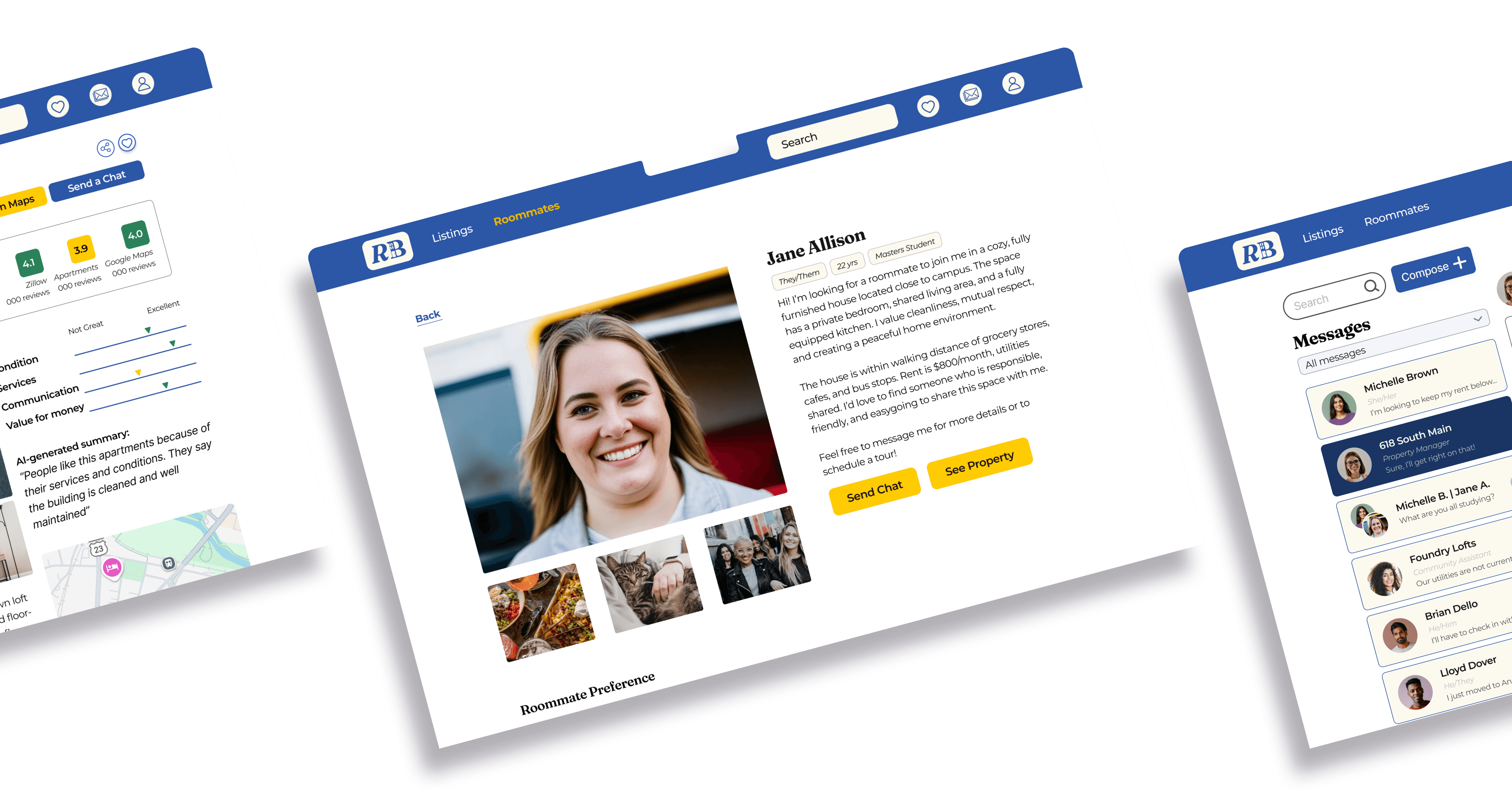
The final design focuses on the moments where students move from browsing options to making decisions. Rather than treating listings, roommates, saved properties, and landlord communication as separate tasks, RentBlue connects them into a more continuous experience.

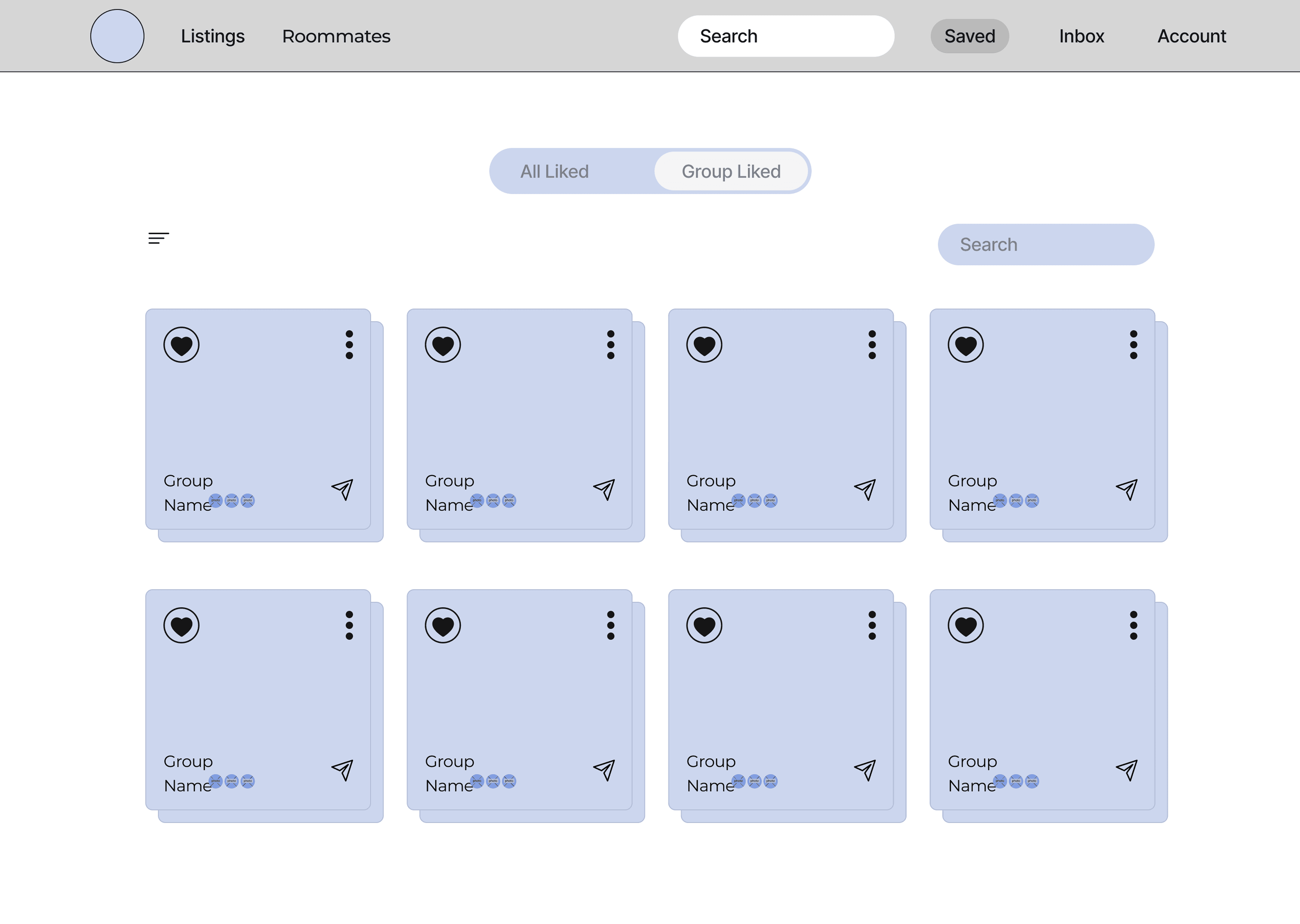
This included search and filtering, property detail pages, roommate discovery, saved listings, messaging, and scheduling touchpoints, with the goal of helping students compare options and take the next step without losing context.
Before and after comparison of key records collection screens. The top row shows the original experience, including unclear record statuses, inconsistent email formatting, and limited action guidance. The bottom row shows updated designs with clearer status labels, actionable call-to-action buttons, a progress tracker dropdown for visibility, and redesigned email modals aligned with brand and usability standards. These updates reflect system-level improvements to communication, transparency, and user guidance across the records collection workflow.

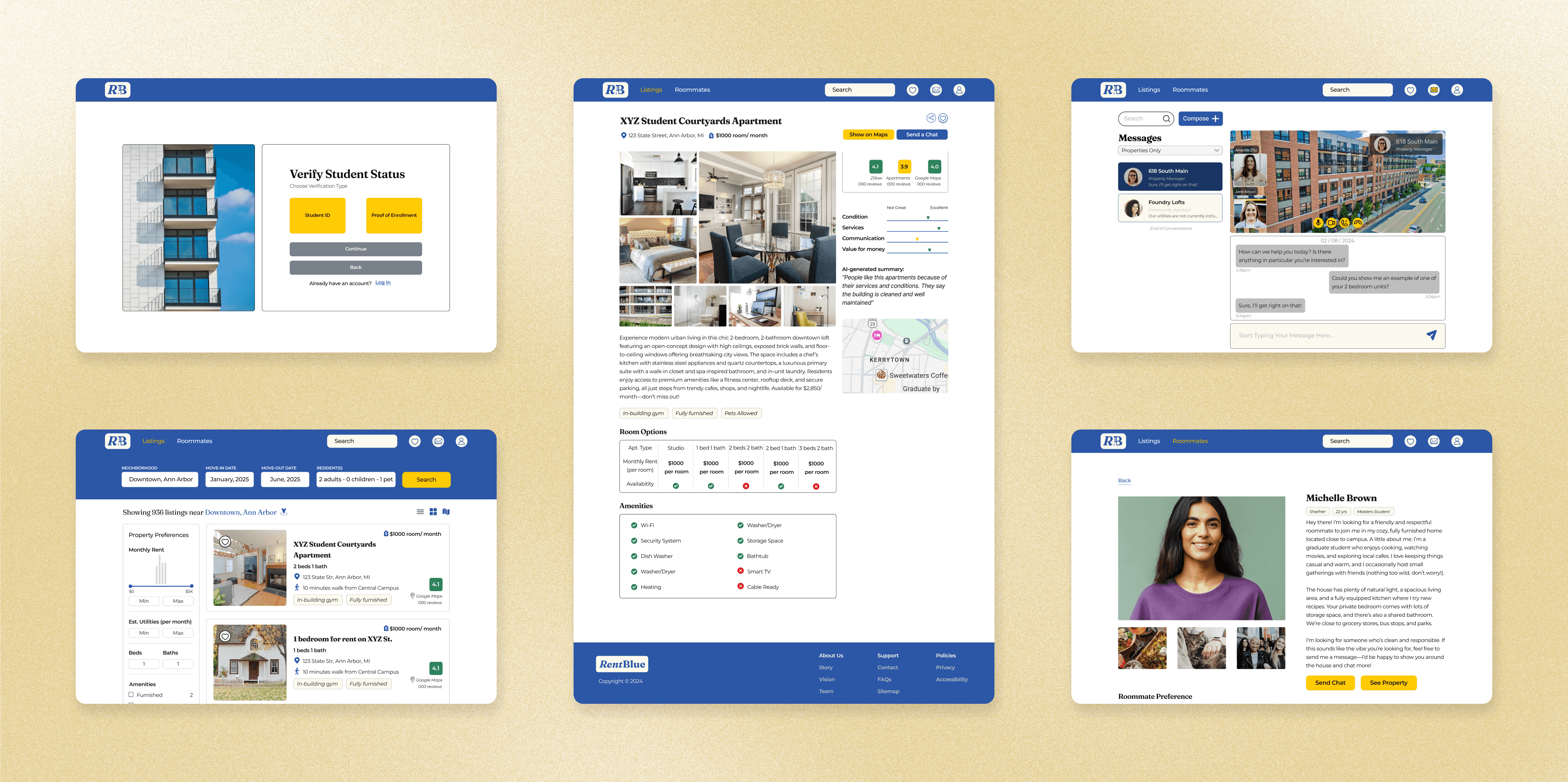
A snapshot of the final RentBlue experience, highlighting key moments across search, comparison, roommate discovery, and communication.

Understanding the Users

We used research and personas to identify the goals, frustrations, and decision points behind the housing search

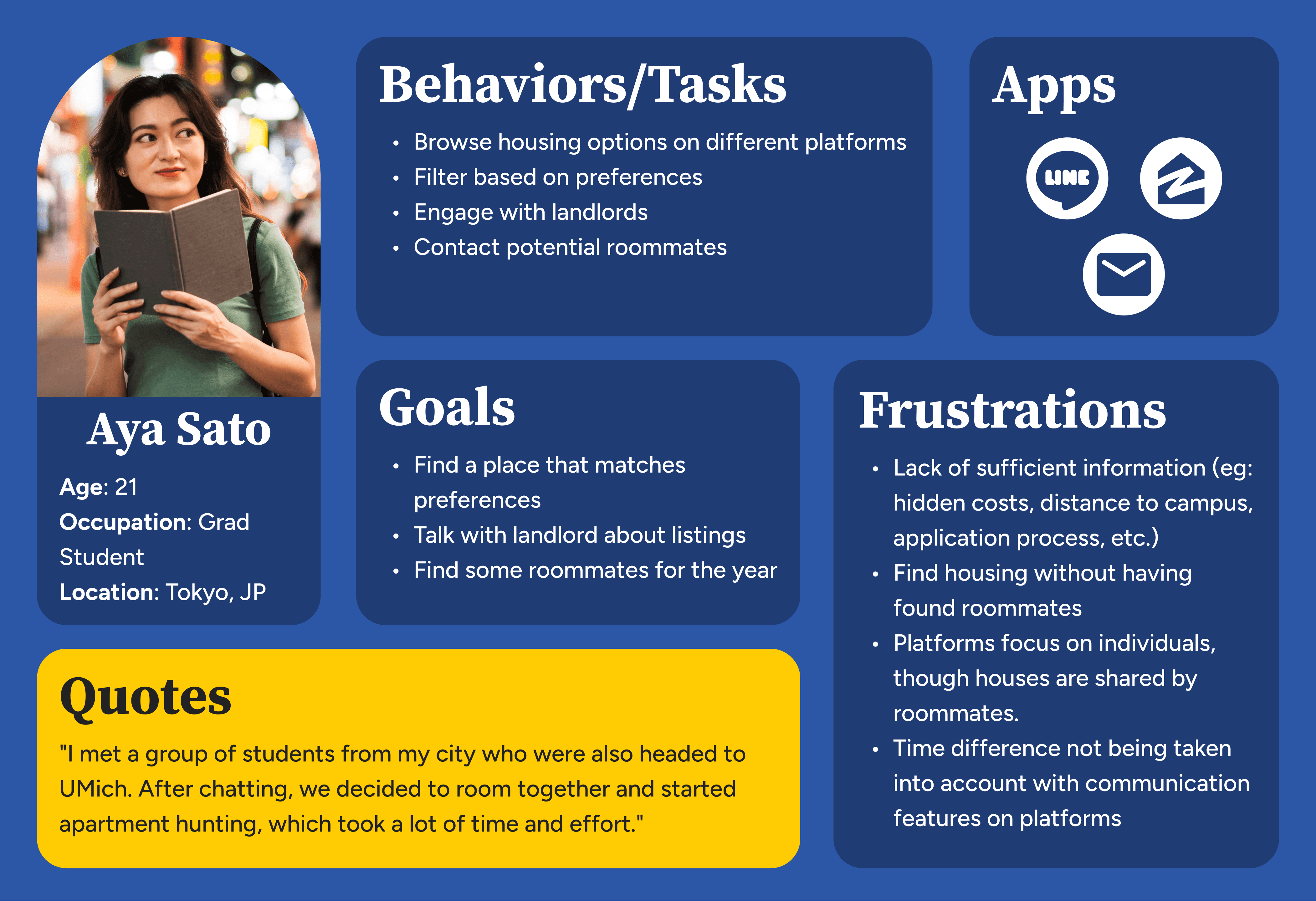
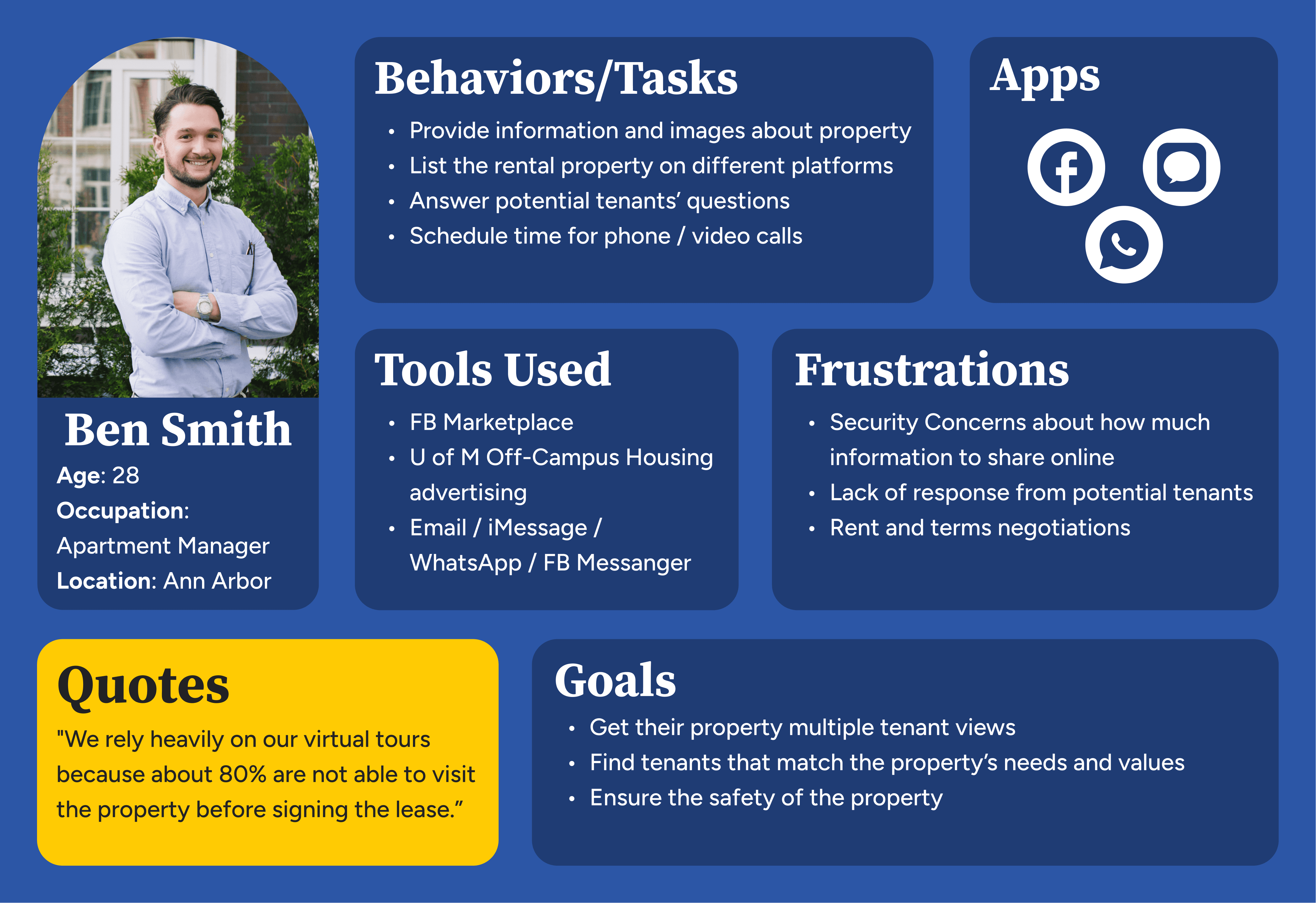
We completed interviews with 10 active tenants and 3 Property Managers. From this, we created personas for two key audiences: student renters and property owners. These helped us map the different needs each group brought to the platform.

For students: the main pain points were around scattered information, limited transparency, roommate uncertainty, and the amount of effort required to compare options.

For property owners: the main pain points centered on managing inquiries, sharing property details, coordinating tours, and building trust with prospective tenants.

This helped us to identify areas for support, including key steps in the housing decision-making process: from browsing and filtering to messaging, scheduling, and saving options for later.
Before and after comparison of key records collection screens. The top row shows the original experience, including unclear record statuses, inconsistent email formatting, and limited action guidance. The bottom row shows updated designs with clearer status labels, actionable call-to-action buttons, a progress tracker dropdown for visibility, and redesigned email modals aligned with brand and usability standards. These updates reflect system-level improvements to communication, transparency, and user guidance across the records collection workflow.

Mapping the Experience

Before designing screens, we mapped the structure of the platform to clarify how different users would move through the site

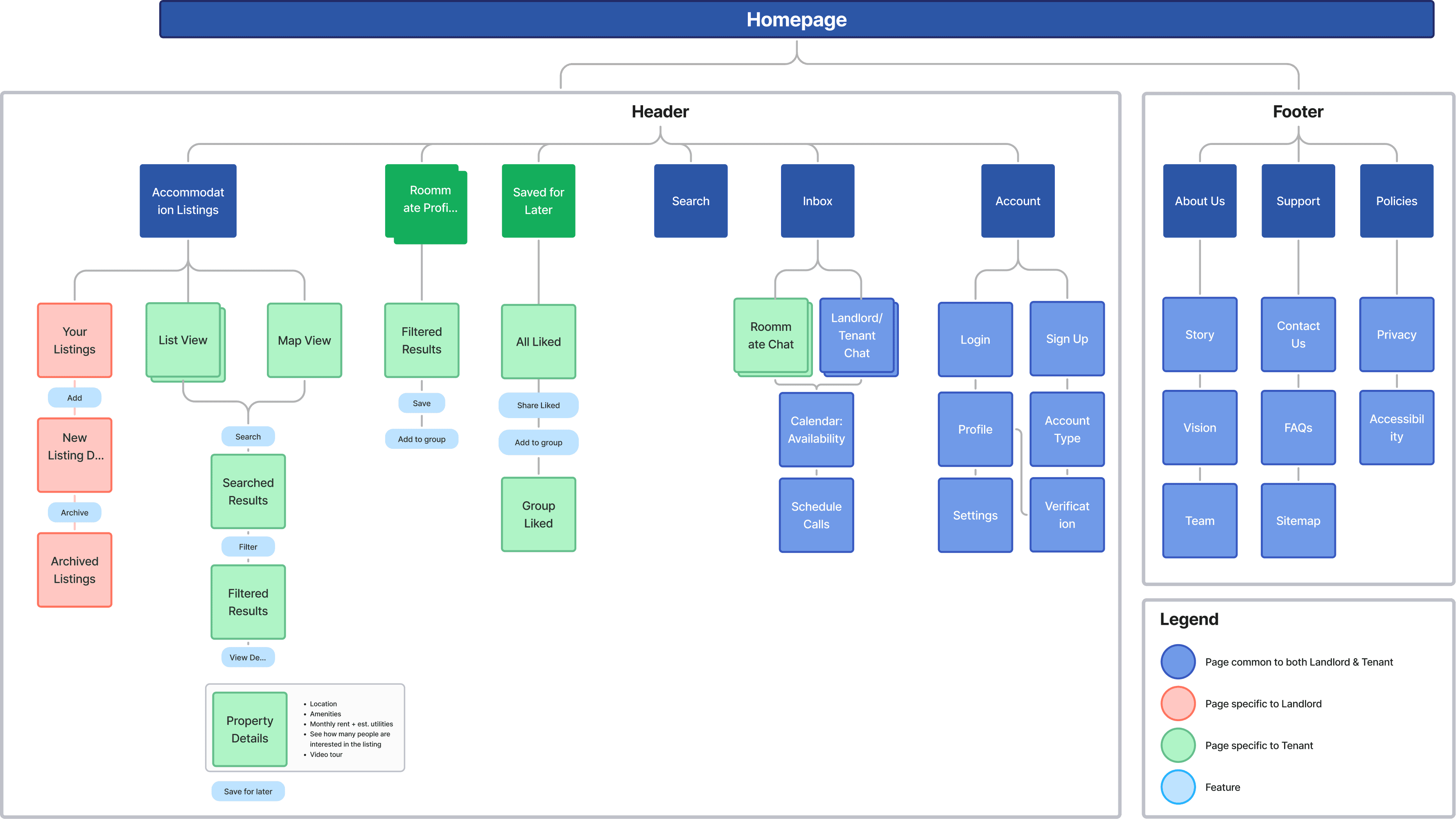
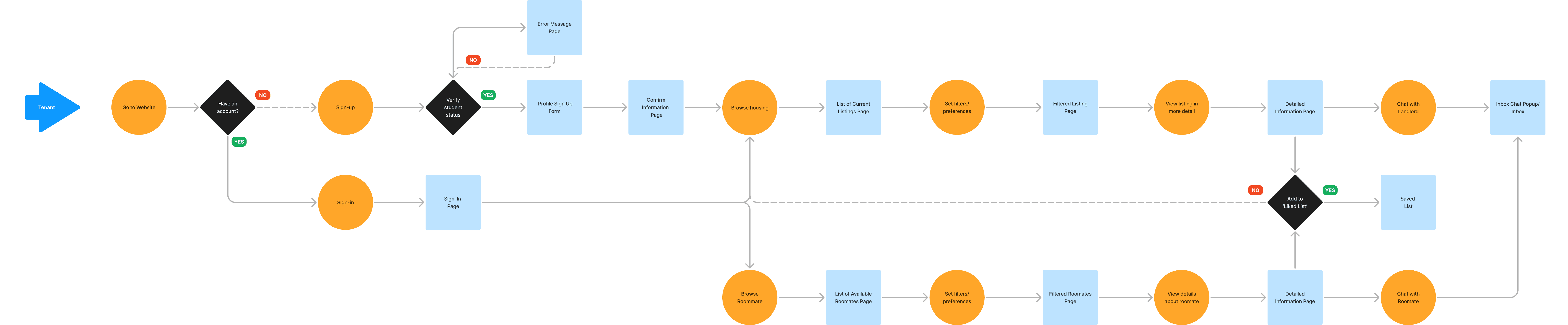
Once we understood the key user needs, we created information architecture and user flows for both tenants and property owners.

This step helped us organize the platform around shared and role-specific experiences. Students needed ways to browse listings, filter results, view detailed property information, explore roommate options, save listings, and contact landlords.

Students needed ways to:

  • Browse listings

  • Filter results

  • View detailed property information

  • Explore roommate options

  • Save listings

  • Contact landlords

Property managers needed ways to:

  • Create listings

  • Manage inquiries

  • communicate with interested tenants

Mapping these flows helped us define the key product areas before moving into wireframes:

  • Listings and filtering

  • Roommate search

  • Saved properties

  • Messaging

  • Scheduling tours or calls

  • Account verification

  • Property owner listing management

Before and after comparison of key records collection screens. The top row shows the original experience, including unclear record statuses, inconsistent email formatting, and limited action guidance. The bottom row shows updated designs with clearer status labels, actionable call-to-action buttons, a progress tracker dropdown for visibility, and redesigned email modals aligned with brand and usability standards. These updates reflect system-level improvements to communication, transparency, and user guidance across the records collection workflow.

Initial Ideation and Mid-Fi Designs

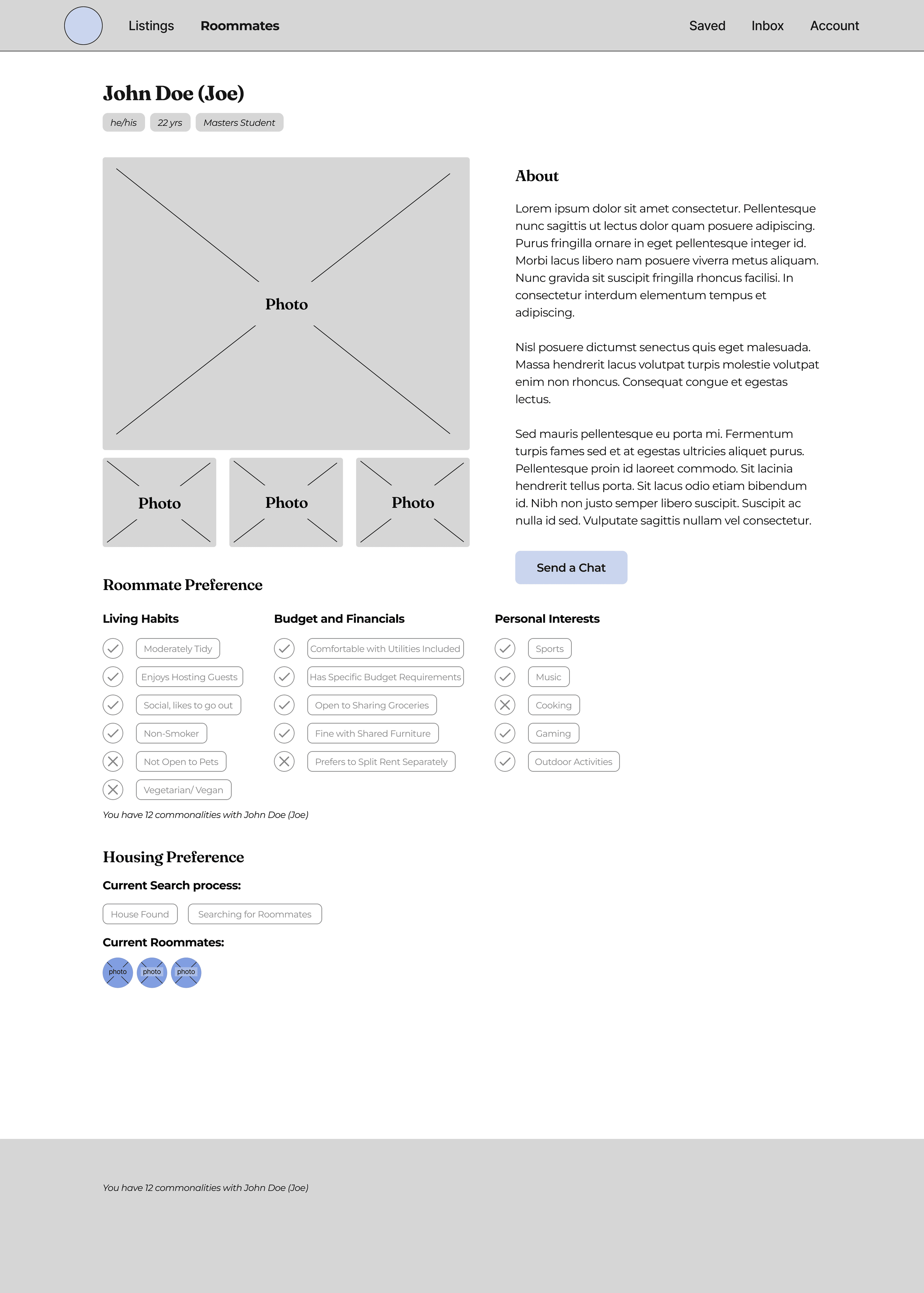
We used sketches and wireframes to explore layout, navigation, and how users would move between search, comparison, and communication

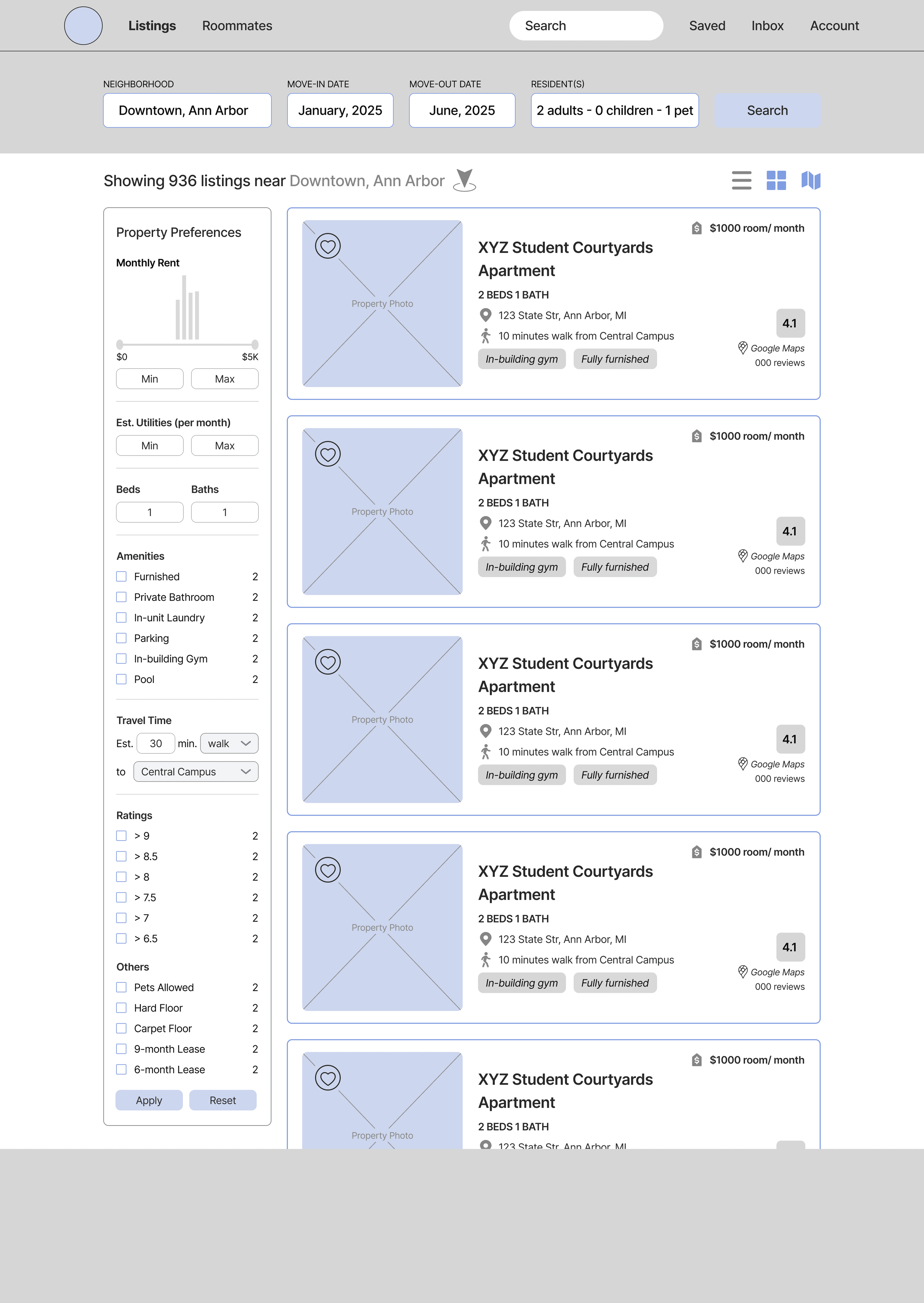
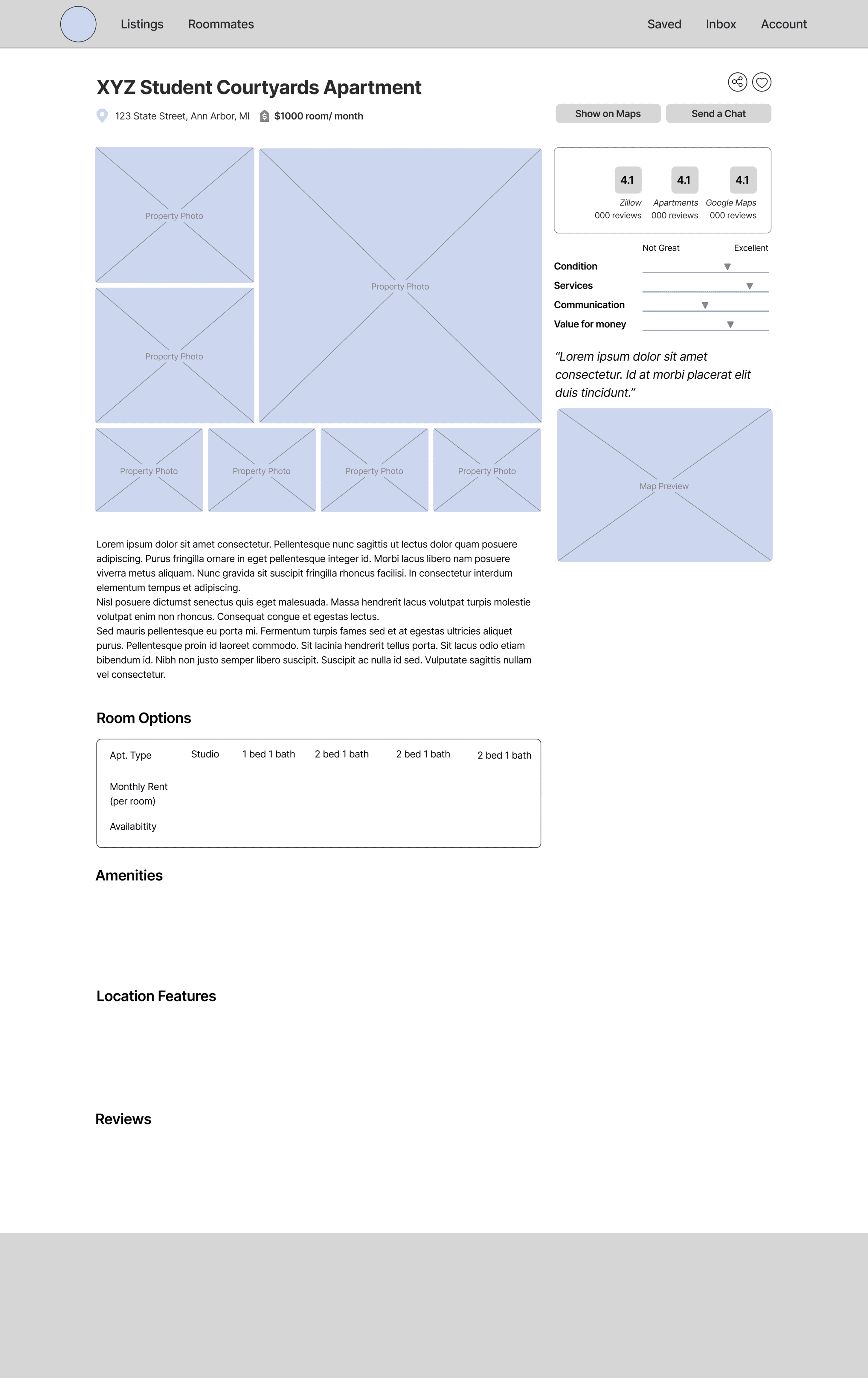
During ideation, we explored how RentBlue could make a complex housing search feel more manageable. I contributed to early sketches and layout explorations, especially around how users would browse options, move into detail pages, and access communication tools.

A key design decision was to keep the experience structured and familiar. Rather than introducing a completely new mental model, we leaned into recognizable housing search patterns: listing cards, filters, saved items, profile details, and direct messaging.

This intentional mapping helps to streamline flows and thus allows users to focus less on learning the interface and more on making housing decisions.
Before and after comparison of key records collection screens. The top row shows the original experience, including unclear record statuses, inconsistent email formatting, and limited action guidance. The bottom row shows updated designs with clearer status labels, actionable call-to-action buttons, a progress tracker dropdown for visibility, and redesigned email modals aligned with brand and usability standards. These updates reflect system-level improvements to communication, transparency, and user guidance across the records collection workflow.

Designing the Messaging Experience

I worked on the messaging flow to help users move from interest to action without needing to leave the platform

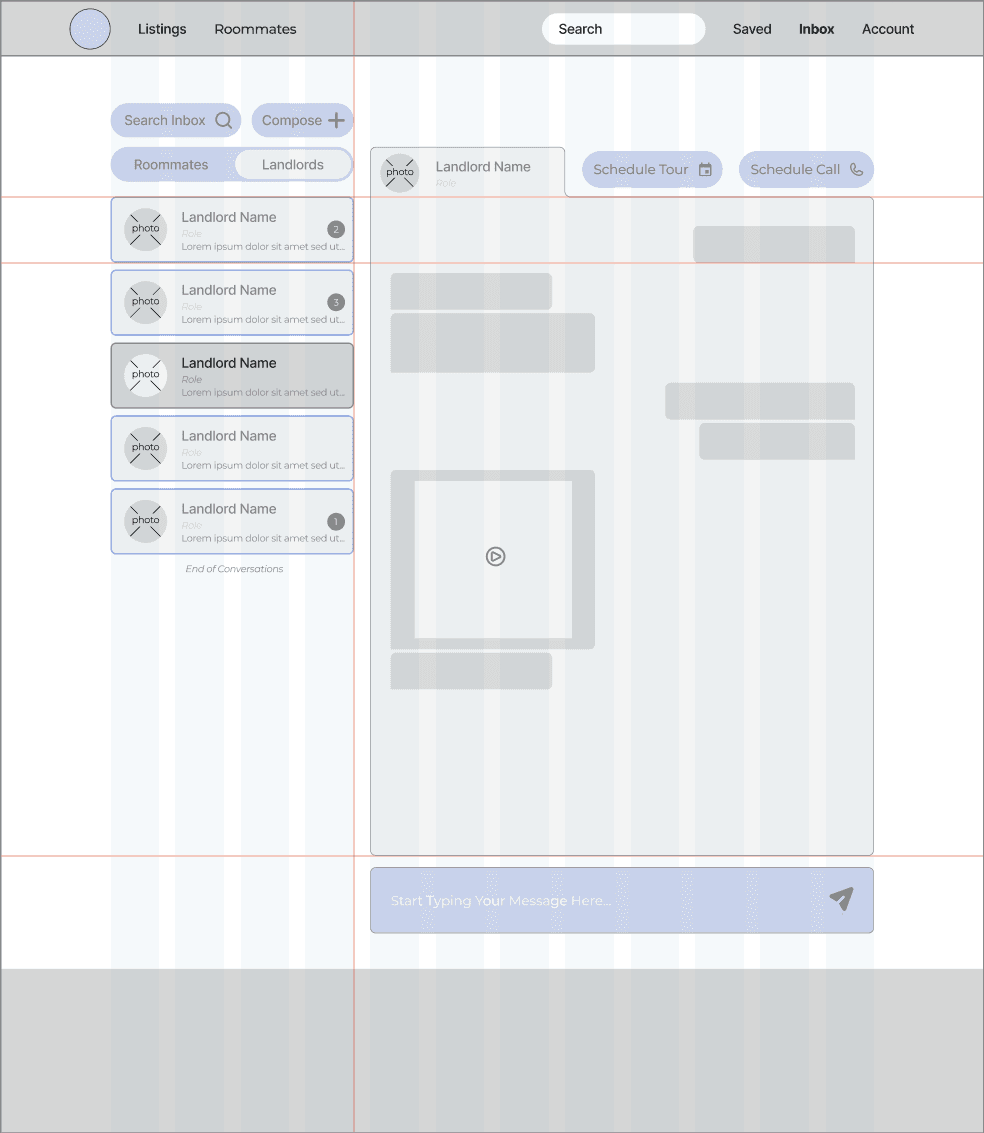
One of my main product areas was the messaging feature. This part of the experience was important because communication is where housing interest turns into next steps.

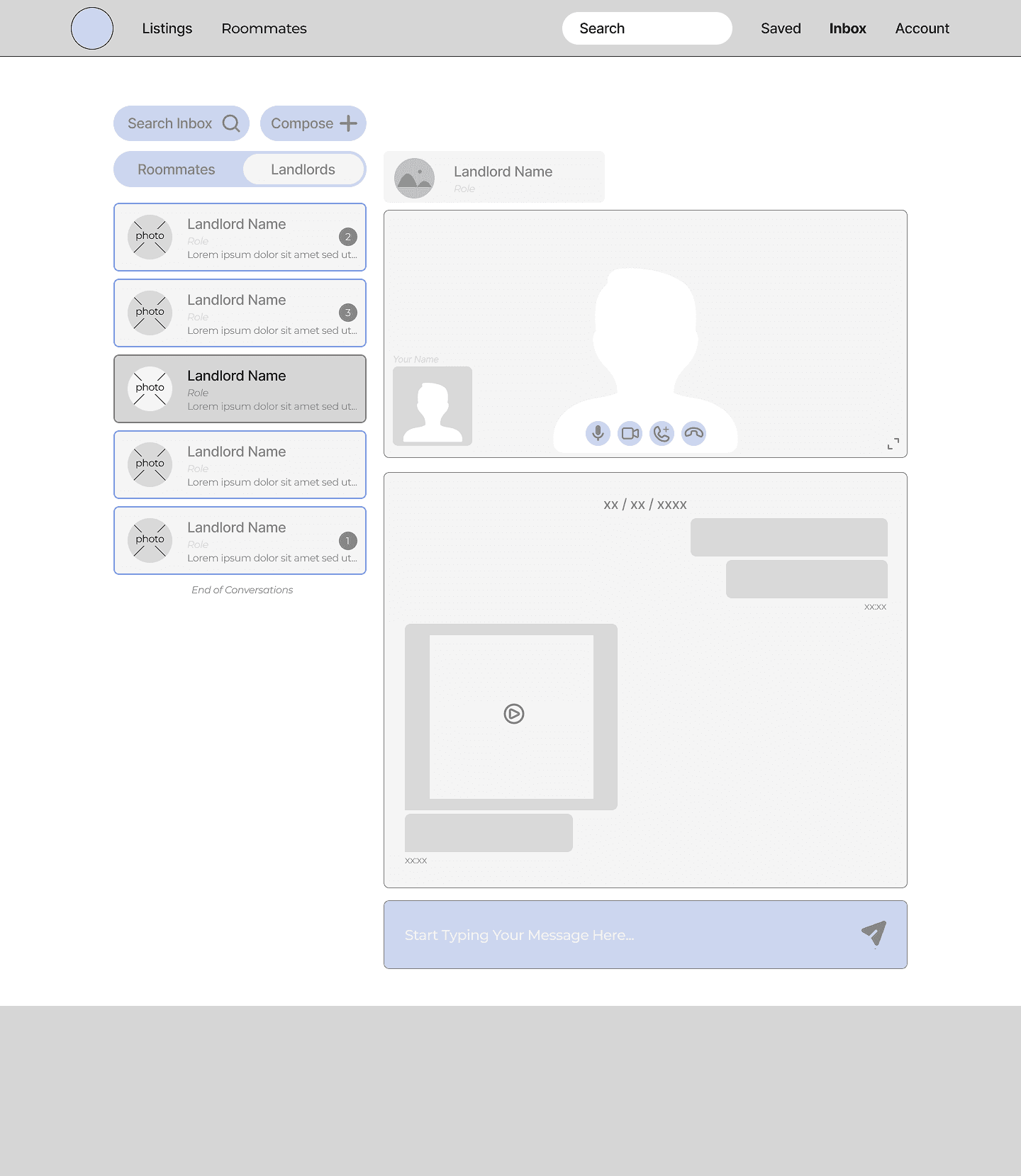
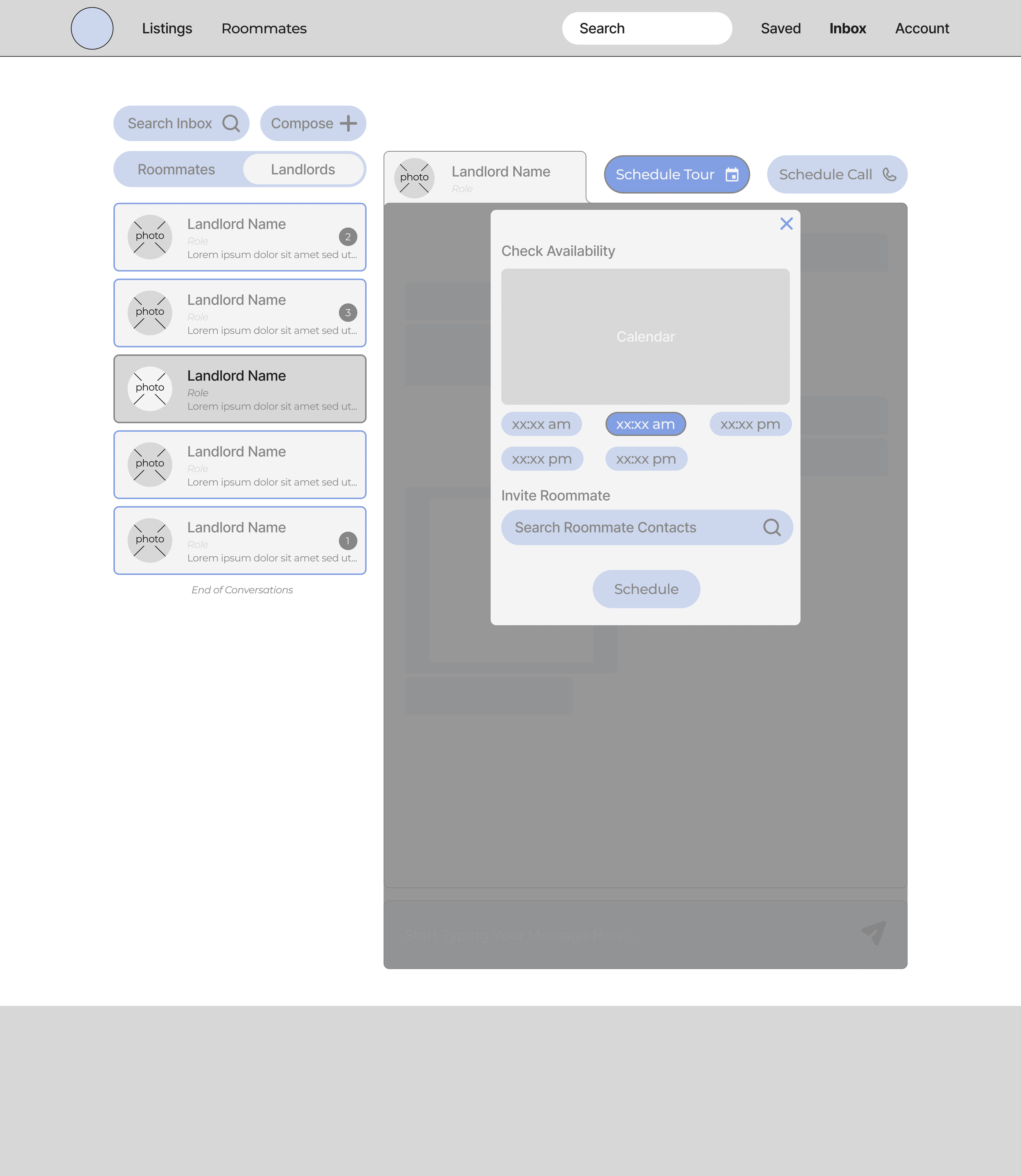
The goal was to give students a clearer way to contact landlords, message potential roommates, and keep conversations organized in one place. Instead of forcing users to move between email, text, Facebook, or separate listing platforms, the messaging page created a centralized space for follow-up.

The design included separate conversation types for roommates and landlords, a searchable inbox, message previews, and actions that supported housing-specific needs, like checking availability or scheduling a tour.
Before and after comparison of key records collection screens. The top row shows the original experience, including unclear record statuses, inconsistent email formatting, and limited action guidance. The bottom row shows updated designs with clearer status labels, actionable call-to-action buttons, a progress tracker dropdown for visibility, and redesigned email modals aligned with brand and usability standards. These updates reflect system-level improvements to communication, transparency, and user guidance across the records collection workflow.

Usability Testing

Testing helped us identify where the prototype was working, where users needed more clarity, and which areas needed refinement.

Testing Process and Results:

After creating the medium-fidelity prototype, we conducted usability testing to evaluate key tasks across the platform.

We tested whether users could complete core actions, including: creating a verified account, searching for listings, viewing property details, exploring roommate profiles, messaging roommates or landlords, and scheduling a call or tour.

The usability test revealed that participants generally appreciated the platform and its current stage of design, describing it as a useful tool for their accommodation-seeking and property-listing needs. While the core functionality resonated with users, they also provided valuable feedback on areas for improvement.

Feature Findability

7/10

7/10

participants indicated that certain features could be more discoverable by leveraging visual enhancements like icons and pop-out designs

Affordance of Click Elements

5/10

5/10

participants suggested that enhancing the design of pictures and cards through a standardized design system could improve their click-ability and usability

Button Wording

6/10

6/10

participants found the included features helpful but suggested refining the wording for better clarity and usability

How We Moved Forward:

Based on our usability testing results, one key update was making action buttons more visible. Buttons like Send Chat and See Property needed stronger contrast so users could quickly identify what to do next.

We also refined the header. Testing suggested that the navigation could feel more streamlined, so we simplified the top bar and used icons more intentionally to reduce visual clutter.

Before and after comparison of key records collection screens. The top row shows the original experience, including unclear record statuses, inconsistent email formatting, and limited action guidance. The bottom row shows updated designs with clearer status labels, actionable call-to-action buttons, a progress tracker dropdown for visibility, and redesigned email modals aligned with brand and usability standards. These updates reflect system-level improvements to communication, transparency, and user guidance across the records collection workflow.

Before: Users felt the header required too much attention to identify navigational components.

Before and after comparison of key records collection screens. The top row shows the original experience, including unclear record statuses, inconsistent email formatting, and limited action guidance. The bottom row shows updated designs with clearer status labels, actionable call-to-action buttons, a progress tracker dropdown for visibility, and redesigned email modals aligned with brand and usability standards. These updates reflect system-level improvements to communication, transparency, and user guidance across the records collection workflow.

After: We replaced text links with clear icon buttons on key pages to improve navigational scannability and recognition.

Building a Consistent Visual System

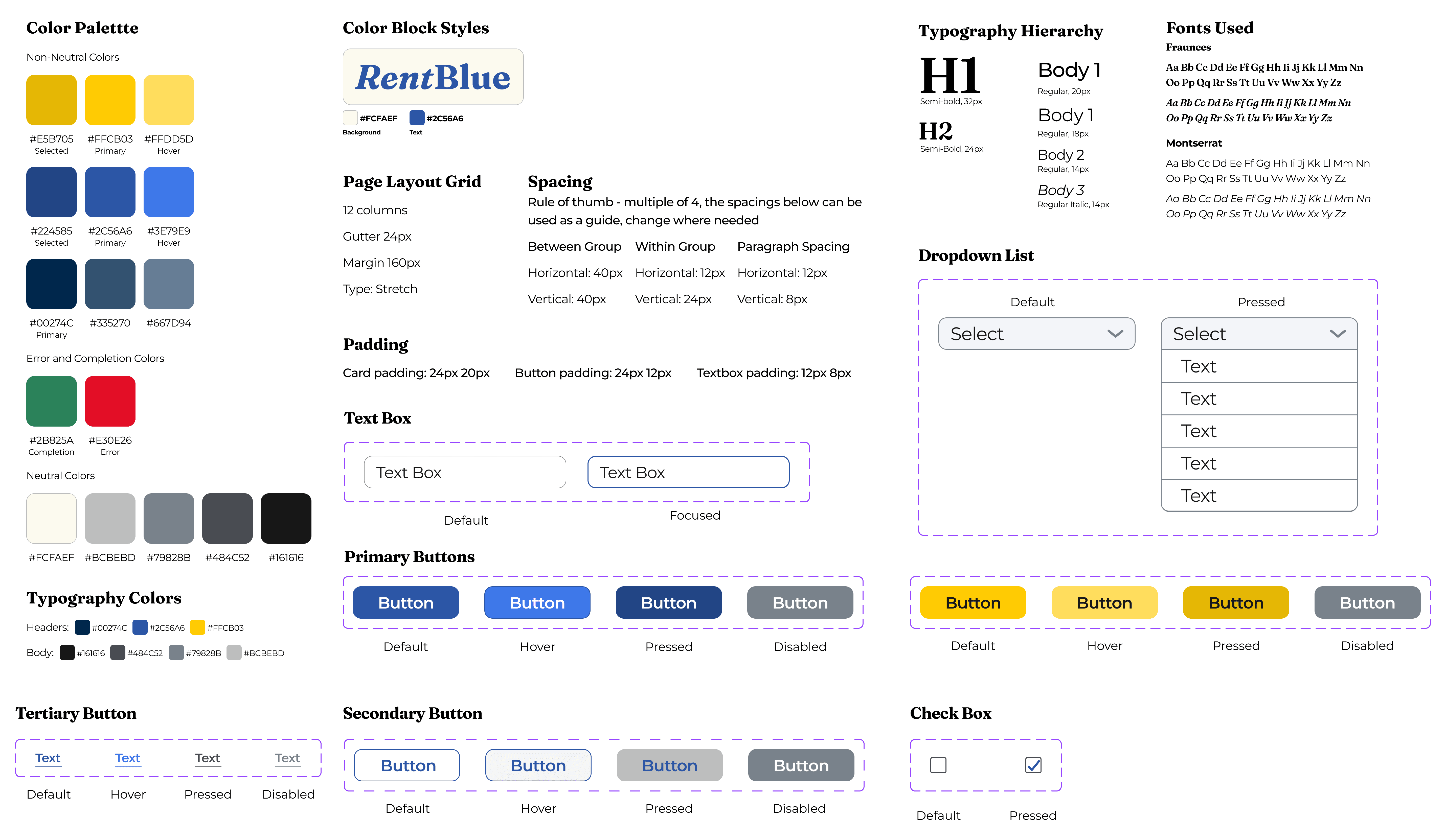
I created a style guide so the platform would feel cohesive across multiple flows and designers

Because RentBlue included several product areas and multiple designers working at once, consistency became an important part of the design process.

I focused on building out the style guide, including color styles, typography, button states, form fields, dropdowns, checkboxes, spacing rules, and grid structure. The goal was to create a shared visual foundation that the team could use across the prototype.

The style guide helped us keep the platform consistent as we moved from mid-fidelity to high-fidelity designs. It also made it easier to standardize recurring interface patterns, like listing cards, filters, CTAs, navigation, and form inputs.
Before and after comparison of key records collection screens. The top row shows the original experience, including unclear record statuses, inconsistent email formatting, and limited action guidance. The bottom row shows updated designs with clearer status labels, actionable call-to-action buttons, a progress tracker dropdown for visibility, and redesigned email modals aligned with brand and usability standards. These updates reflect system-level improvements to communication, transparency, and user guidance across the records collection workflow.

A Deeper Look into the Final Design

Bringing the redesigned RentBlue experience to life through polished high fidelity designs

The final prototype brings together the core moments students move through when searching for off-campus housing. Instead of designing each feature as a separate destination, we focused on how students would move between them: verifying their account, searching for listings, comparing property details, exploring roommate fit, and starting conversations with landlords or other students.

Verifying Student Status

Building trust in the housing search before users begin browsing

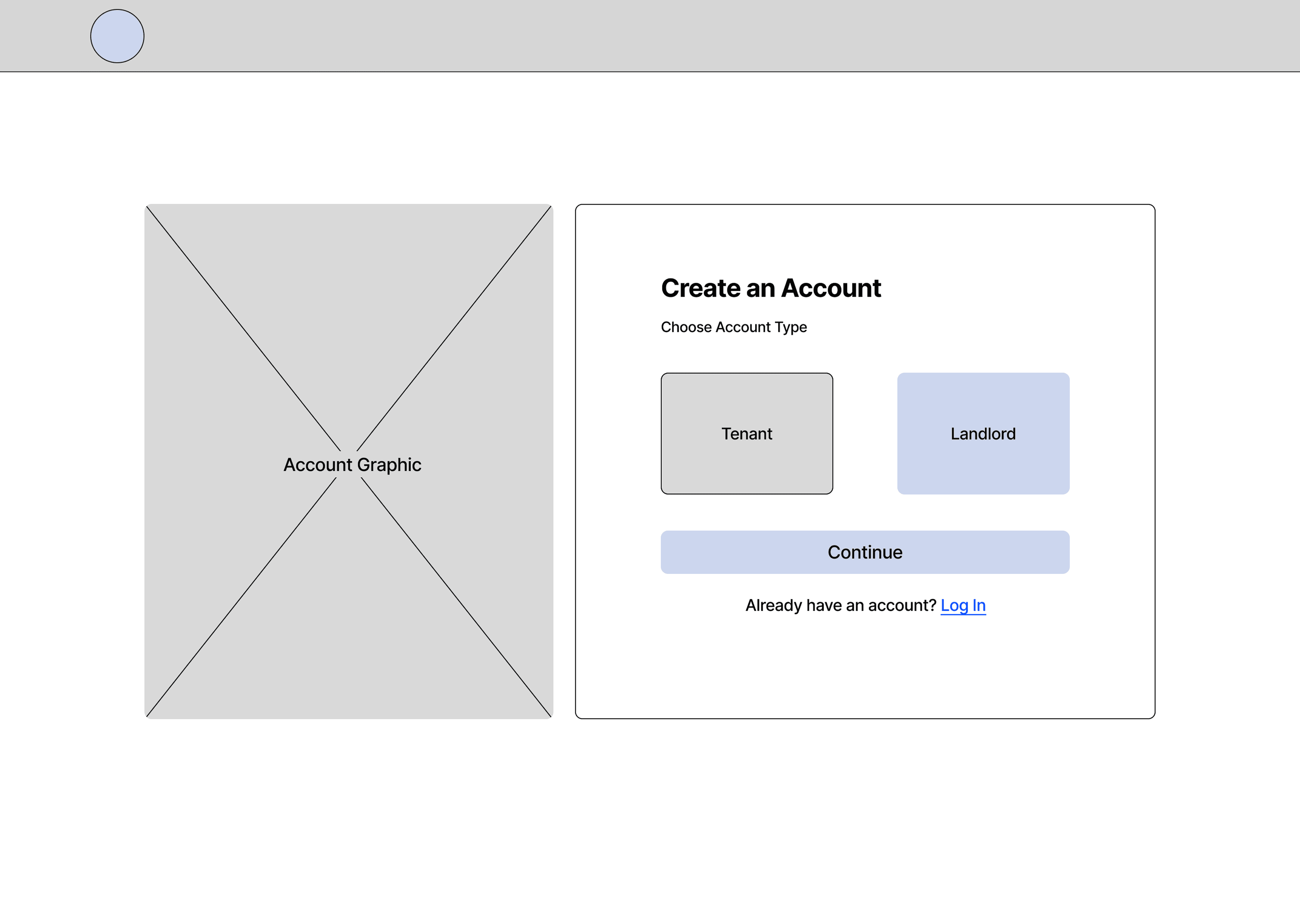
RentBlue starts with the “Login / Sign Up” page where students can verify their status to create a safer and more trusted environment for both other renters and property owners. Since housing search involves personal information, roommate matching, and direct communication, this step helps establish credibility before users move deeper into the platform.

The screen keeps the process simple by offering clear verification options, including student ID and student email. This makes the entry point feel straightforward while reinforcing that RentBlue is designed specifically for student renters.

Personalized browsing modules transform discovery from a utility task into a more engaging and curated experience.

Filtered search results allow students to efficiently scan and compare available listings, while the property detail page consolidates pricing, amenities, and location data to support final decisions

Search and Listing Discovery

Helping students narrow a crowded housing market into options they can evaluate efficiently

The “Property Listings” page is designed to help students quickly filter housing options based on practical needs, such as location, rent, amenities, lease terms, and availability. Instead of forcing users to search aimlessly on platforms (like Google Maps) without structure, RentBlue gives students tools to narrow results and compare options more intentionally.

Listing cards highlight key information upfront, including images, pricing, location, bedroom details, and quick actions.This addresses the typical lack of transparency in housing searches, enabling faster scanning while still providing a clear path to deeper property details.

The “Property Details” page consolidates fragmented information into a single, organized view to help students evaluate listings efficiently. By bringing together photos, pricing, location, amenities, and room options, the design highlights key decision-making data in one place, reducing the need for students to hunt for details across multiple sources

Roommate Profiles

Finding the best fit for you

Housing decisions are not only about the property. Roommate compatibility is just as important, if not more, for most students. The “Roommate Profiles” page gives prospective tenants a way to understand a potential roommate’s preferences, lifestyle, and housing goals before starting a conversation.

Traditional roommate matching may look like: searching on Facebook pages, reaching out on your college’s Slack or Discord, talking to management and hoping for the best, or just winging it! This page was designed to make roommate discovery feel more structured and less ambiguous. Instead of having to rely on scattered social threads or hoping for the best, students can review profile information like:

  • Tidiness Hosting preferences

  • Smoking habits

  • If they have pets

  • Openness to sharing groceries

  • Whether they like to cook at home

  • Allergies or food restrictions, and more!

This can help them in deciding whether they want to message to see if they are a roommate match or view a shared property connection.

Personalized browsing modules transform discovery from a utility task into a more engaging and curated experience.

The messaging page centralizes conversations with properties and roommates so students can follow up without confusion

Messaging

Creating a central place for landlord and roommate conversations

The “Messaging” page was one of my main focus areas. It supports the moment when students move from passive browsing to confidently transitioning into the next phase of their housing search. This could include: contacting a property, asking a question about a listing, or reaching out to a potential roommate.

The design keeps conversations organized by separating message types (roommates vs. properties) and tying communication back to housing context. RentBlue treats messaging as part of the housing decision-making flow, helping users to keep track of who they contacted, which property they asked about, and what next steps they’ve completed

Impact and Considerations

Turning a messy, fragmented housing search into a streamlined vision that students can actually feel confident using

The final concept showed how RentBlue could support students by reducing the number of places they need to search, compare, and communicate during the housing process.

Impact for students:

  • Verified Roommate Matching: Secure, university-vetted profiles paired with compatibility filters to take the guesswork out of finding a roommate

  • Streamlined Property Search: Intuitive list views and robust filtering to help students find the right place faster

Impact for property managers:

  • Effortless Visibility: Gives listings direct, continuous exposure to the student body, reducing the need for costly external advertising

  • Targeted Tenant Matching: Gives owners greater confidence by connecting them with students whose needs align perfectly with the property's specific accommodations

We also recognized important limitations for a site like this. Features like roommate search and property messaging would need strong safety, verification, and moderation considerations before being developed further. This was especially important because housing involves trust, personal information, and real-world risk.

Conclusion

What this project taught me

This project reinforced that housing search is not just about finding listings, it is about helping people make confident decisions in a high-stakes, often unclear process.

The problem space seemed relatively easy at first, because housing search is such a familiar experience. As my team moved through user research and interviews, mapping, prototyping, and testing, it became clear that the bigger challenge was helping users understand all their options and helping them feel confident in their choices.

This project strengthened my ability to:

  • Design for trust and clarity when users are making decisions with incomplete information

  • Create visual consistency across multiple product flows through a shared style guide

  • Translate usability feedback into clearer designs, including areas like: navigation, higher contrast CTAs, and clarifying next steps


Want to see more of my work?

The collaborative turn in AI

Designing real-time collaboration inside ChatGPT so teams can think, build, and iterate together in one shared environment

The collaborative turn in AI

Designing real-time collaboration inside ChatGPT so teams can think, build, and iterate together in one shared environment

Travel planning, simplified

A travel planning app concept designed to support the full travel journey.

The collaborative turn in AI

Designing real-time collaboration inside ChatGPT so teams can think, build, and iterate together in one shared environment

The collaborative turn in AI

Designing real-time collaboration inside ChatGPT so teams can think, build, and iterate together in one shared environment

Available for work

Let’s create something great together.

I'm not just here to design products, I'm here to connect with people!